 Localhaven
Chapter 1 · free · 15 min
What you will build - and the 10 safety rules
By the end of this course you have your own private home AI assistant: you talk to it at home, you message it from your phone when you are out, it answers from a language model that runs on your own hardware, and it can do useful things - but only the things you allowed, and the risky ones only after you tap OK.
This first chapter needs no hardware and no typing. It is the map. Every later chapter builds one piece of it.
The picture
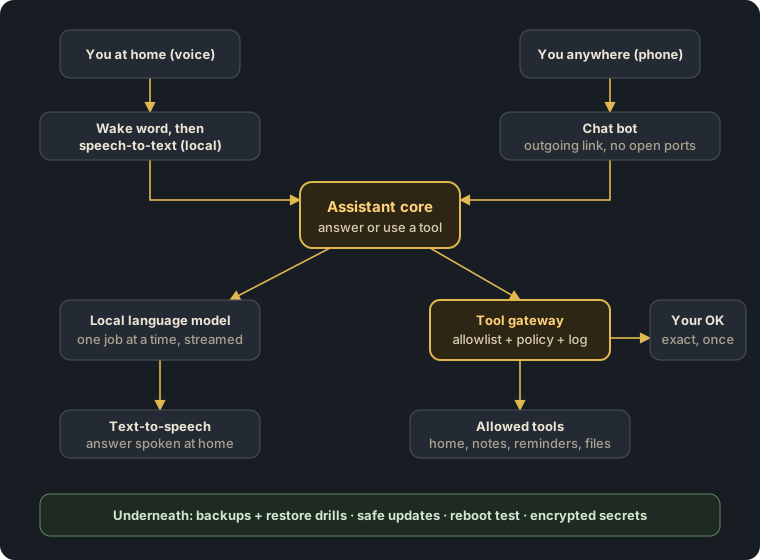
The parts, in plain words
- One small server at home. A quiet mini PC is enough for everything here. It runs Linux and Docker. Chapter 2 shows what to buy (or reuse) and why memory matters more than a big graphics card.
- The language model ("the brain") runs locally with an open model. Your questions never leave your house. On a small box it does one job at a time - so we put a queue in front of it and stream answers, which makes it feel fast (chapter 4).
- Ears and voice. A wake word listener runs all the time and uses almost nothing; only after the wake word does speech-to-text turn your sentence into text. Text-to-speech reads the answer back in a natural voice (chapters 5-6). All of it local.
- The assistant core decides what to do with a request: answer it, or use a tool.
- The tool gateway is the heart of the safety design. The model never gets a shell and never talks to the internet directly. It can only ask the gateway to run a tool by name, with checked arguments. The gateway looks the tool up in a policy: allowed, needs your OK, or never (chapter 7).
- Approvals on your phone. A risky action (publish something, spend money, change a system setting) creates a message that shows exactly what will happen, with a code. Only your reply "OK + code" runs it - once, for that exact action, before it expires (chapter 8).
- Secrets (API keys, bot tokens) live encrypted; each service only sees the one secret it needs; they never appear in git, logs or chats (chapter 9).
- Backups that restore, safe updates and a reboot test - the boring parts that decide whether your assistant still works next year (chapter 10).
- Remote access without open ports (chapter 11) and, if you want, a safe link to your smart home (chapter 12).
The 10 safety rules
These are the rules our own system runs by. Every chapter follows them; if a step breaks one, it is a bug.
- Nothing is exposed to the internet. No port forwarding. Remote access goes through a private VPN link or an outgoing chat-bot connection.
- The model never gets a shell. It can only request named tools through the gateway. No "run any command".
- Allowlist, not blocklist. Every tool is listed with what it may do. Anything not listed is refused.
- Risky actions need your OK - for that exact action. Single-use, expiring, bound to the exact arguments. If the arguments change, the OK is void.
- Least privilege everywhere. Each container runs as its own user, without sudo, without the Docker socket, and only on the networks it needs.
- Secrets are encrypted, split per service, and never printed - not in git, not in logs, not in chat.
- Everything important is logged (who asked, which tool, what happened) - without secrets.
- Backups are only real after a restore drill. Test a real restore every few months.
- Change one thing at a time, write it down, and prove the system still starts cleanly after a reboot.
- Keep a manual fallback. Lights, locks and heating must still work if the assistant is off.
What you need before chapter 2
- An idea of what you want it to do first (for example: questions by voice, reminders, a morning summary, controlling a few lights). Start small - one useful thing that works beats ten half-working ones.
- Time: most chapters take one evening. Chapter 2 is shopping and planning, chapter 4 is the first "wow".
- No programming needed. You will copy, check and run tested commands and templates, and we explain every step.
What this course is not
- It is not a download of anyone's personal assistant, and we will never ask for access to your system.
- It is not a cloud service - there is no account with us and nothing is sent to us.
- It is not "AI does everything". It is a careful, useful assistant that stays under your control.
Next (free): Chapter 2 - Plan it: hardware, memory, power and what one small box can really do.